Resume ExampleRetailMid Level

Apple Resume Examples & Writing Guide

Use this Apple resume example to write a clear, ATS-friendly resume for Apple Store and Apple retail roles, including Specialist, Technical Specialist, Creative, and customer support positions.

Experience Level
Mid Level
Category
Retail
Reader Rating
4.8 / 5
  • Tailor every Apple resume to the role, store setting, customer experience language, and posting.
  • Use a clean layout that works for both ATS tools and busy Apple retail hiring teams.
  • Write a summary that shows customer value, product knowledge, technical support, and teamwork.
Resume Example (Text Format)

Jordan Miller

Apple Specialist

jordan.miller@email.com | (415) 555-2841 | San Francisco, California | linkedin.com/in/jordan-miller-retail

Profile

Apple Specialist candidate with 4 years of customer service and electronics sales experience. Skilled in needs-based selling, product demonstrations, iPhone and Mac setup, POS systems, technical troubleshooting, and calm service recovery in high-traffic retail environments.

Work Experience

Electronics Sales Associate, CityTech Retail

San Francisco, California | Mar 2021 - Present

  • Guide 40+ customers per shift through phone, tablet, laptop, and accessory options by asking needs-based questions and explaining features in plain language.
  • Deliver product demos, complete device setup support, process POS transactions, and coordinate service handoffs for customers needing technical help.
  • Support floor presentation, inventory counts, accessory restocking, and launch weekend coverage during high-traffic sales periods.

Customer Service Representative, BrightConnect Mobile

San Francisco, California | Jun 2019 - Feb 2021

  • Resolved billing, account, upgrade, and device setup questions while maintaining a calm tone with frustrated customers.
  • Explained mobile plan options, trade-in steps, and warranty coverage in simple terms to help customers make confident decisions.
  • Documented customer issues in CRM notes and escalated technical cases to repair or activation teams when needed.

Education

  • Associate Degree in Business Administration, City College of San Francisco | San Francisco, California | 2019

Languages

  • Spanish

Certifications

  • Apple Device Support Training | 2025
  • CompTIA IT Fundamentals+ | 2024

Skills

  • Customer experience
  • Consultative selling
  • Apple product knowledge
  • Technical troubleshooting
  • Device setup
  • POS systems

A strong Apple resume should show that you can create a clear customer experience, explain technology in simple language, work well with a team, and support sales or service goals in a busy store. This is true whether you are writing an entry-level Apple resume, a mid-career Apple Specialist resume, or a senior Apple retail resume for a leadership or technical support path. Apple retail teams are not only looking for someone who likes iPhone, Mac, iPad, Apple Watch, or AirPods. They are looking for someone who can listen carefully, understand customer needs, guide product choices, set up devices, solve problems, and protect the quality of the store experience. That is why this Apple resume example focuses on proof. It shows how to turn retail sales, customer service, hospitality, help desk work, technical support, product demos, training, and volunteer tech help into clear resume content.

Quick breakdown

Why this Apple resume works

1

It makes the candidate easy to understand in a few seconds: what Apple role they want, how they help customers, and why they can handle a busy retail floor.

2

It uses Apple resume keywords naturally, so the resume can work for ATS tools and still sound human to a store leader, recruiter, or hiring manager.

3

It turns retail and support experience into proof by showing consultative selling, technical troubleshooting, customer education, product setup, and teamwork.

4

It keeps product knowledge, customer service skills, sales results, technical support, training, and availability easy to find instead of hiding them under vague enthusiasm for technology.

Fast template guide

What to copy from this Apple resume example

Do not copy the resume word for word. Copy the structure, the section order, and the level of detail. A strong Apple resume example teaches you what to show: customer experience, product discovery, consultative selling, product demos, technical support, device setup, teamwork, store operations, and availability. Your own version should use your real store names, customer groups, tools, sales results, support examples, and product knowledge.

A clear header that names the target Apple retail role, such as Specialist, Technical Specialist, Creative, Business Expert, or Apple Store team member, without crowding the top of the page.

A short Apple resume summary that shows customer focus, product knowledge, teamwork, and sales or support value instead of a broad statement about liking Apple products.

Retail, customer service, technical support, sales, or training experience written with real proof such as customer discovery, product demos, device setup, troubleshooting, queue support, and follow-up.

Apple-relevant skills such as customer needs assessment, consultative selling, iPhone and Mac support, product setup, visual merchandising, appointment flow, POS systems, and conflict de-escalation.

Training, certifications, languages, and availability details placed where Apple retail hiring teams can quickly see readiness for store hours, busy launches, team coverage, and customer-facing work.

Build the right structure

Apple resume sections to include

A strong Apple resume should include the sections employers expect to scan quickly, plus optional sections that help you prove readiness when your direct Apple experience is still growing. The goal is not to add every possible section. The goal is to build a page that lets Apple retail recruiters and store leaders understand your customer fit, product knowledge, technical support ability, teamwork, and readiness for a busy store environment.

Must-have sections

  • Contact information
  • Apple resume summary or objective
  • Retail, customer service, sales, technical support, or training experience
  • Education
  • Certifications, product training, or technical credentials
  • Apple retail skills

Optional sections that strengthen the resume

  • Apple product knowledge
  • Technical troubleshooting
  • Customer service awards
  • Sales achievements
  • Visual merchandising
  • Product demos or workshops
  • POS and inventory systems
  • Languages
  • Volunteer technology support
  • Availability
  • Portfolio, LinkedIn, or personal tech projects

An Apple resume should not read like a generic retail resume. Apple retail hiring teams need to see how you create a strong customer experience, explain technology clearly, work in a team, and support sales or service goals without sounding pushy. For a new Apple applicant, customer service, electronics retail, phone sales, tutoring, help desk work, volunteer tech support, and hospitality roles can all count when you connect them to product guidance, problem solving, empathy, and communication. For an experienced Apple retail candidate, the resume should move faster into customer discovery, product demos, AppleCare or service support, store operations, launch readiness, coaching, and measurable sales or satisfaction results. The best Apple resume example keeps the structure simple because recruiters and store leaders need to scan many applications quickly.

Smarter ordering

Best Apple resume section order

The best section order depends on your experience level. A new Apple applicant should not use the same structure as a senior retail candidate with years of product support, coaching, and sales results. Place your strongest proof where the reader will see it first. For a new applicant, that may be customer service, retail, hospitality, volunteer tech help, product knowledge, and schedule flexibility. For an experienced candidate, it is usually customer outcomes, product demos, technical support, store operations, and team leadership.

Entry-level Apple retail applicant

  1. Contact information
  2. Apple resume objective or short summary
  3. Customer service, retail, hospitality, or volunteer tech support experience
  4. Apple product knowledge and transferable skills
  5. Education
  6. Certifications, training, or relevant coursework
  7. Languages, availability, or personal tech projects

Experienced Apple Specialist or retail candidate

  1. Contact information
  2. Apple resume summary
  3. Retail sales, customer support, or technical service experience
  4. Apple retail skills
  5. Sales results, customer satisfaction, or service metrics
  6. Education
  7. Certifications, product training, or leadership development

Career-change Apple applicant

  1. Contact information
  2. Transferable Apple resume summary
  3. Customer-facing or technical experience
  4. Transferable experience
  5. Apple product knowledge and support skills
  6. Education and training
  7. Projects, volunteer work, languages, or availability

Put the strongest proof near the top. A new Apple applicant can lead with customer service, product knowledge, and transferable support experience because those details prove readiness. An experienced retail or tech support candidate should lead with customer outcomes, sales performance, troubleshooting, demos, teamwork, and store operations. A career-change candidate should connect past work to Apple duties such as explaining complex ideas, listening to customer needs, training users, resolving issues, working weekends, handling busy queues, and staying calm under pressure.

Choose an Apple resume example by experience level

Use this template

Use this mid-career Apple resume example to study how customer discovery, product demos, sales support, technical troubleshooting, and store operations take priority over general retail duties.

Apple Resume Playbook

A strong Apple resume should show customer experience, product knowledge, teamwork, and clear support skills in a way a store leader can understand quickly.

An Apple retail hiring team does not read a resume like a normal retail employer reads a resume. A recruiter, store leader, or hiring manager is usually scanning for very specific proof. They want to know whether you can listen to customer needs, explain Apple products clearly, guide people toward the right solution, and stay calm in a busy store. They also want to see if you can support teammates, handle floor flow, learn product details quickly, and create the kind of customer experience that fits a premium retail environment. A good Apple resume example should make all of that easy to see without forcing the reader to dig.

That is why this guide focuses on plain proof, not fancy language. You do not need dramatic wording to write a strong Apple resume. You need specific customer and product details. Retail sales, hospitality, customer service, phone support, help desk work, electronics sales, volunteer tech help, product demos, training, and personal technology projects can all become strong resume evidence when you connect them to customer discovery, consultative selling, technical troubleshooting, device setup, service recovery, and team collaboration. The target keyword for this page is Apple resume example, but the content is written to help a real person build a better resume, not just to repeat a keyword.

  • Turn retail, hospitality, technical support, and customer service into strong Apple resume proof.
  • Write an Apple resume summary that sounds specific, calm, and useful.
  • Use Apple resume keywords for ATS without stuffing the page.
  • Place product knowledge, training, certifications, availability, and customer results where Apple hiring teams can find them quickly.

How to write an Apple resume

A strong Apple resume should make three things clear within a few seconds: what Apple role you want, how you help customers, and why the store can trust you with a high-touch customer experience. That means your resume should show customer discovery, product guidance, technical support, device setup, teamwork, sales support, and calm communication. An Apple resume example that only lists duties is weak because many retail jobs share the same basic tasks. The stronger version explains how you asked better questions, matched customers to solutions, explained technology in simple language, handled service issues, supported product launches, and helped customers leave more confident.

  1. Read the job posting and highlight the Apple role, customer experience language, product support needs, sales expectations, schedule needs, and technical tools.
  2. Match your summary, skills, and experience bullets to the Apple retail work the posting cares about most, as long as the match is honest.
  3. Use a clean format with standard headings so ATS tools and busy Apple hiring teams can scan the resume quickly.

What Apple retail hiring teams look for first

Most Apple retail roles look for proof that you can create trust with customers. That does not always mean you need direct Apple Store experience. It means you need to show strong listening, clear explanation, good judgment, teamwork, and product curiosity. For a Specialist role, the resume should show customer discovery, product recommendations, sales support, and device setup. For a Technical Specialist or Genius path, it should show troubleshooting, service handoff, diagnostic thinking, and patient user support. For a Creative or training-focused path, it should show demos, workshops, coaching, and the ability to make complex tools feel simple. For an Apple resume, this proof should appear in the summary, skills, experience bullets, education, and certifications. Do not trap your best customer details in one section.

High-priority proof points

  • Customer discovery and needs-based product guidance
  • Consultative selling and service recovery
  • Technical troubleshooting and device setup
  • Product demos, workshops, or user education
  • Team collaboration, store flow, and launch readiness

Good proof for new Apple applicants

  • Retail, hospitality, or call centre customer service
  • Electronics sales, phone sales, or accessory recommendations
  • Volunteer tech help for friends, family, schools, or community groups
  • POS systems, inventory support, and visual merchandising
  • Flexible availability, weekend work, and peak-season coverage

Writing for both ATS and Apple hiring teams

Apple applications may be reviewed through online systems before a person studies the resume closely. The people reading the resume may also search for clear terms from the posting. This is why an ATS-friendly Apple resume should use normal retail and support language: customer experience, consultative selling, product demonstrations, technical support, troubleshooting, Apple product knowledge, device setup, POS systems, visual merchandising, service recovery, team collaboration, and inventory support. The goal is not to trick the system. The goal is to describe your real background with the same words Apple retail roles use when they describe customer-facing work.

Statistical Insight

If your resume says only that you love Apple products, the reader still does not know what you can do for customers. A better Apple resume shows the work behind your interest. Instead of saying you are passionate about technology, show how you explained phone features to a customer, helped someone recover an account, guided a laptop purchase, or taught a new user how to back up photos. Instead of saying you are a team player, show how you supported queue flow, reset demo devices, helped during launch weekends, or documented customer issues for a technical handoff. The best Apple resume example turns soft claims into customer actions.

Start with one strong master resume, then adjust it for each Apple role. An Apple Specialist resume, Technical Specialist resume, Creative resume, Genius resume, Business Expert resume, and Apple seasonal retail resume should not all sound the same. The core structure can stay similar, but the wording should change based on customer needs, product support, sales goals, technical depth, and store environment. Read the posting first, mark the repeated terms, and decide which parts of your background match honestly. Then update your summary, skills, and bullets so the fit is visible right away.

  1. Use the posting's wording for customer experience, product demos, technical support, selling, service recovery, teamwork, and tools when it matches your experience.
  2. Use action words such as guided, demonstrated, resolved, explained, supported, coached, processed, documented, escalated, and improved.

A good Apple resume is not a long list of every retail task you have ever done. It is a focused document that helps a hiring team answer one question: can this person create a helpful, clear, and trusted Apple customer experience? Keep the resume clear, use action words, include numbers where they are true, and connect your work to customer outcomes. For example, customers helped per shift, product categories supported, service handoffs, setup tasks, launch weekends, training sessions, or customer satisfaction comments can all make a bullet stronger. These details are simple, but they make the resume feel real.

Choosing the best Apple resume format and template

The best Apple resume format is clean, simple, and easy to read. Apple retail is customer-focused, but the resume still needs a professional structure. A store may receive many applications for Specialist, Technical Specialist, seasonal, and support roles, so your layout should help the reader find your summary, experience, education, certifications, and skills without effort. For most Apple applicants, reverse-chronological order is the safest choice because it highlights recent customer-facing work first. If you are new to retail or tech support, you can still use that format while placing customer service, volunteer tech help, product knowledge, or training higher so your strongest proof is not buried.

For the ATS

  • Use standard headings such as Summary, Experience, Education, Certifications, and Skills.
  • Save the final resume as a PDF when the portal allows it, or follow the application instructions exactly.
  • Spell out important terms such as Apple Specialist, customer experience, technical support, device setup, and POS systems at least once.

For recruiters and store leaders

  • Leave enough white space so the page does not feel crowded.
  • Keep job titles, store names, dates, products, and customer results easy to find.
  • Choose a professional template that supports your customer proof instead of distracting from it.
Do

Use reverse-chronological order when you have retail, sales, service, or technical support experience, because recent customer-facing work usually matters most.

Keep the layout straightforward so a reader can find your target Apple role, product knowledge, customer strengths, and strongest experience quickly.

Don't

Do not use tables, charts, text boxes, heavy graphics, or unusual fonts that can make the resume harder to read.

Do not make the resume look like a product brochure. Apple hiring teams need clear customer proof, not decoration.

Picking the right Apple resume template

Most Apple applicants move faster with a tested resume template. Pick one that keeps the summary near the top, gives enough room for customer-facing bullets, and makes product knowledge easy to spot. Avoid templates that use tiny fonts, heavy icons, complex columns, or design elements that take attention away from your retail and support proof. An Apple resume template should support the content, not compete with it. The best template for an Apple resume example is usually modern, simple, and ATS-friendly, with clear headings and enough white space for quick scanning.

Browse our resume templates or open the resume builder when you are ready to turn this Apple resume example into your own finished draft. Start with the structure, then replace every sentence with your real customer experience, product knowledge, technical support, sales results, training, and Apple resume skills.

Apple resume summary example: show customer fit fast

The Apple resume summary is the short paragraph at the top of the page. It should show customer fit fast. A strong summary names the target role or experience level, the customer setting, and the strengths that matter most for the job. It can also mention product knowledge, sales support, technical troubleshooting, device setup, teamwork, languages, schedule flexibility, or years of experience when those details help. Keep it short enough to scan, but specific enough that it does not sound like every other Apple resume.

The main goals of the summary

  • Name the Apple role, store setting, product area, or customer group you fit best.
  • Highlight the customer, sales, technical, or training strengths that matter most for the job.

Keep the tone warm and professional, but stay specific. Strong Apple resume summaries use real retail and support language, not broad claims about passion or loyalty. A new applicant might lead with customer service, hospitality, product curiosity, POS work, and volunteer tech help. A mid-career candidate might lead with electronics sales, device setup, product demos, customer issue resolution, and store operations. A senior candidate might lead with team coaching, launch readiness, technical escalation, service recovery, and training. The summary should match the level of the candidate.

  • For a new Apple applicant, mention retail, hospitality, customer service, volunteer tech support, or product demos.
  • For an experienced applicant, mention years of customer-facing work, product categories, sales support, troubleshooting, and store operations.
  • For a career changer, connect past training, coaching, communication, support, or technical work to Apple retail.
Expert Tip

Skip empty phrases like “lifelong Apple fan,” “works well under pressure,” or “people person.” Apple hiring teams expect interest, effort, and patience. Use the limited space to explain what you do for customers. A better summary says that you are an electronics retail associate with product demo and device setup experience, or a technical support candidate skilled in troubleshooting and service handoffs, or a senior retail specialist with team coaching and launch support experience. This kind of wording helps both ATS tools and real hiring teams.

A simple formula works well: target role or experience level + customer setting + top support skills + customer value. For example, an entry-level Apple resume summary can say that the candidate has retail and volunteer tech support experience, with skills in POS transactions, device setup, patient communication, and product demos. A senior Apple resume summary can mention team coaching, product guidance, launch readiness, service recovery, and technical support. The formula keeps the summary clear without sounding robotic.

When the posting uses clear language, mirror it. If the job asks for customer experience, write customer experience instead of customer happiness. If it asks for technical support, use that exact phrase when it matches your work. If it asks for product demonstrations, service recovery, Apple product knowledge, business customers, or team collaboration, include those terms only if you can support them with real experience. This is how you write for ATS without stuffing keywords. The resume still sounds natural because the words are connected to your real customer story.

Adaptable resume summary example

Apple Specialist candidate with 4 years of customer service and electronics sales experience. Skilled in needs-based selling, product demonstrations, iPhone and Mac setup, POS systems, technical troubleshooting, and calm service recovery in high-traffic retail environments.

Apple experience resume example: prove retail and support work clearly

The experience section is where your Apple resume becomes believable. It should prove that you can work with customers in real settings. For new applicants, this can include retail, hospitality, call centre, cashier, volunteer tech support, tutoring, campus tech help, phone sales, or customer service roles. For experienced applicants, it should show stronger customer discovery, product guidance, device setup, troubleshooting, sales support, inventory tasks, and store operations. For senior applicants, it should also show coaching, launch readiness, service recovery, training, or leading others through high-volume retail moments. The title matters, but the customer work behind the title matters more.

Statistical Insight

Apple hiring teams care about the work behind the title. If you explained product choices, solved customer problems, handled account recovery, reset demo devices, processed returns, documented service issues, supported teammates, or taught customers how to use a feature, that experience counts. The key is to write it clearly. A bullet like “helped customers with phones” is too thin. A stronger bullet says “guided 35+ customers per shift through phone upgrades, trade-in steps, accessory options, and device setup using plain-language explanations.” The second version gives volume, product context, service steps, and communication style.
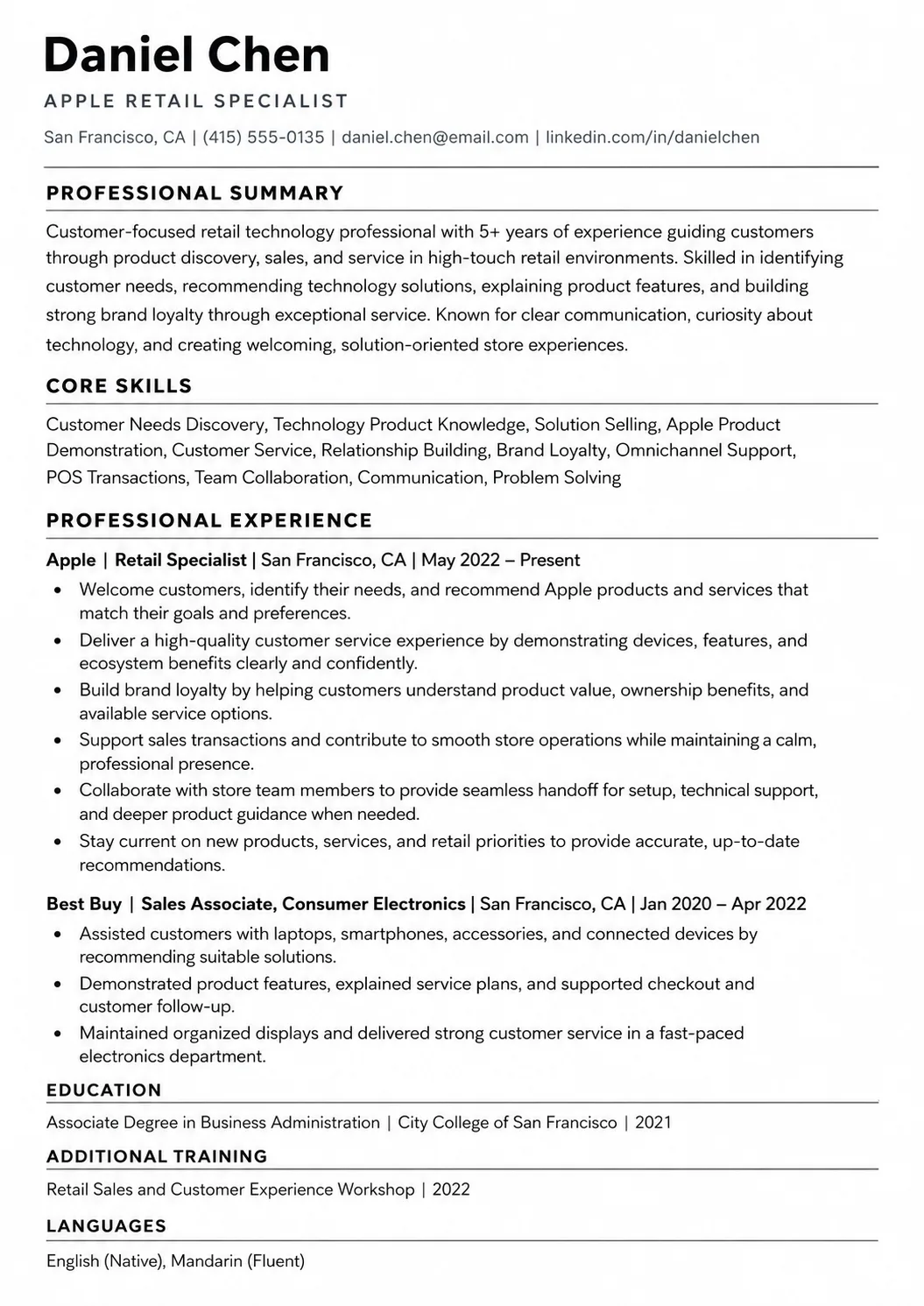
Use reverse-chronological order so your most recent and most relevant experience appears first. For each role, include the position title, employer, location, dates, and short bullets. Start each bullet with a customer or store action such as guided, demonstrated, resolved, explained, supported, processed, documented, escalated, trained, coached, restocked, or improved. Then add context. Good context includes customer volume, product categories, POS tools, technical issues, service handoffs, launch periods, store size, customer satisfaction, or training. Numbers can help, but only use them when they are true.

  • Position title
  • Store, company, service desk, or organization name
  • Location and dates
  • Product categories, customer groups, tools, or support channels you handled
  • Short bullets that show what you sold, demonstrated, supported, resolved, documented, or improved

The best Apple resume bullets use clear customer actions. Instead of saying helped customers, explain how you helped them. Instead of saying worked in sales, explain the product questions, demos, needs discovery, or setup support you handled. Instead of saying solved problems, explain the troubleshooting steps, escalation path, or customer education that supported the fix. An Apple resume example should not make the candidate sound bigger than the truth. It should make the truth easy to understand. That is what makes the experience section credible.

Adaptable resume employment history example

Electronics Sales Associate, CityTech Retail

San Francisco, California | Mar 2021 - Present

  • Guide 40+ customers per shift through phone, tablet, laptop, and accessory options by asking needs-based questions and explaining features in plain language.
  • Deliver product demos, complete device setup support, process POS transactions, and coordinate service handoffs for customers needing technical help.
  • Support floor presentation, inventory counts, accessory restocking, and launch weekend coverage during high-traffic sales periods.

Customer Service Representative, BrightConnect Mobile

San Francisco, California | Jun 2019 - Feb 2021

  • Resolved billing, account, upgrade, and device setup questions while maintaining a calm tone with frustrated customers.
  • Explained mobile plan options, trade-in steps, and warranty coverage in simple terms to help customers make confident decisions.
  • Documented customer issues in CRM notes and escalated technical cases to repair or activation teams when needed.

Apple skills section example: show customer, product, and technical strength

The Apple skills section should reflect daily Apple retail work. It should help a recruiter, store leader, or ATS tool see that you can guide customers, explain products, support sales, solve simple technical issues, and collaborate with a team. Good Apple resume skills are not random personality words. They are skills connected to actual customer-facing work: customer experience, consultative selling, product demonstrations, Apple product knowledge, device setup, technical troubleshooting, POS systems, visual merchandising, service recovery, and team collaboration.

Keep a longer master list outside your resume, then choose the skills that fit each Apple posting. A good Apple resume does not need every skill you have. It needs the skills that match the role, store setting, and customer needs in the job description. For example, an Apple Specialist resume may highlight customer discovery, product demos, device setup, POS systems, and sales support. A Technical Specialist resume may highlight troubleshooting, repair intake, escalation, account recovery, and patient user education. A Business Expert resume may highlight business customers, solution matching, relationship building, training, and follow-up.

Statistical Insight

Apple hiring teams often prioritize skill groups such as:

  • Customer experience, needs discovery, and consultative selling
  • Product demonstrations, device setup, and Apple ecosystem knowledge
  • Technical troubleshooting, service handoffs, and user education
  • POS systems, inventory support, visual merchandising, and store flow
  • Team collaboration, launch readiness, communication, and service recovery

A strong Apple skills section mixes hard skills with communication and customer support skills. Do not separate skills in a way that makes the page confusing. Group them if your template allows it, or list the most important ones first. The most useful Apple resume skills are usually the ones that also appear in your experience bullets. If you list technical troubleshooting, show a bullet where you solved a device, account, or software issue. If you list product demonstrations, show a bullet where you explained features or ran a setup session. This makes your skills believable instead of decorative.

Adaptable resume skills section example
  • Customer experience
  • Consultative selling
  • Apple product knowledge
  • Technical troubleshooting
  • Device setup
  • POS systems

Education resume example: keep training and product knowledge easy to find

Education matters on an Apple resume, but the way it matters depends on your background. For entry-level Apple applicants, education may help show communication, business, technology, design, or media interest. Include your degree, school, location, graduation date, major, minor, relevant coursework, honors, or projects when those details help. If you studied information technology, business, marketing, communication, computer science, design, media production, or retail management, connect it to the Apple role through your skills and experience bullets.

Once you have more retail or technical support experience, your customer results may lead the page. But education, certifications, and product training still need to be easy to find. This is especially important for technical support paths, business customer roles, training roles, and candidates who want to show they can learn Apple products quickly. Use exact wording for training and certifications when possible. A small wording mistake can create confusion, while clear wording helps both ATS tools and hiring teams confirm that you meet the role requirements.

Adaptable resume education example
  • Associate Degree in Business Administration, City College of San Francisco | San Francisco, California | 2019

Certifications and training for Apple roles

Apple retail resumes can include product, technical, customer service, or sales training when it supports the role. Useful examples may include Apple Device Support, Apple Deployment and Management, CompTIA A+, Google IT Support, customer service training, retail sales training, accessibility training, leadership training, or business technology coursework. If the role is more technical, make troubleshooting and user support easy to spot. If the role is more sales-focused, make customer discovery and product demos easy to spot. If a credential is pending, say that clearly and include the expected completion date when you have one.

  • Apple Device Support Training | 2025
  • CompTIA IT Fundamentals+ | 2024

Before applying, make sure your training, certification wording, product knowledge, and experience match the posting. This matters for both ATS tools and human readers. If the role asks for customer experience, product demos, technical support, business customers, or teamwork, use the exact wording that fits your background. Do not exaggerate. Clear, honest wording builds trust, and trust is one of the most important parts of an Apple resume.

Adaptable resume certifications example
  • Apple Device Support Training | 2025
  • CompTIA IT Fundamentals+ | 2024

Bullet upgrade

Weak vs strong Apple resume bullets

Use the stronger version as the model: start with a clear customer or store action, add context, and include the detail or outcome that proves the work mattered. Apple resume bullets should show how you listened to customers, explained technology, supported sales or service, solved problems, handled store flow, and helped teammates.

Weak

Sold Apple products to customers.

Stronger

Guided 40+ customers per shift through iPhone, iPad, and Mac options by asking needs-based questions, comparing features in plain language, and completing device setup support after purchase.

The stronger bullet adds volume, product scope, customer discovery, communication style, and follow-through. That is much stronger than saying you sold products.

Weak

Helped customers with technical issues.

Stronger

Resolved common mobile device issues by checking settings, explaining backup options, walking customers through account recovery steps, and escalating repair needs to technical staff when needed.

This version shows troubleshooting, customer education, judgment, and escalation. It gives Apple hiring teams a clearer picture of service readiness.

Weak

Worked on the sales floor.

Stronger

Maintained a clean, high-traffic sales floor by restocking accessories, resetting demo devices, supporting queue flow, and helping teammates during product launch weekends.

The stronger version explains what floor support meant and why it mattered. Store operations are more valuable when tied to customer flow, presentation, and team coverage.

ATS keyword bank

Apple resume keywords for ATS

Apple recruiters, store leaders, and applicant tracking systems often scan for exact role language. Use these Apple resume keywords only when they honestly match your background. Good keywords are not magic words. They are normal retail and support terms that help the hiring team understand your fit: customer experience, consultative selling, product demonstrations, technical support, troubleshooting, Apple product knowledge, device setup, POS systems, visual merchandising, and team collaboration.

Customer experienceConsultative sellingProduct demonstrationsTechnical supportTroubleshootingApple product knowledgeDevice setupPOS systemsVisual merchandisingTeam collaboration

Use Apple resume keywords only when they match your real background. Do not repeat Apple, Specialist, or customer experience in every line. The safest method is to mirror the posting language for the role, store setting, product support, selling, service, training, and teamwork, then place those words naturally in your summary, skills, experience bullets, and certifications.

Matching application

Apple cover letter tips

Pair this resume with a short Apple cover letter that explains why you fit the store, what customer proof matters most, and why your service style fits Apple retail. Do not repeat the whole resume. Use the cover letter to connect one or two resume details to the role, such as product demos, technical troubleshooting, customer education, teamwork, or sales support.

Name the Apple role, store type, customer setting, or product area you are targeting in the first paragraph.

Connect one strong resume example to customer experience, product discovery, device setup, technical support, or team coverage.

Explain why your communication style fits Apple customers instead of repeating your Apple resume summary.

Final review

Apple resume checklist before applying

Before you send your Apple resume, review it against the job posting one last time. Look for missing role terms, customer experience language, product knowledge, sales support, troubleshooting, technical support, teamwork, launch readiness, and availability details. Small changes can make the resume easier to read and more relevant.

  • Did you name the exact Apple role or store path you want, such as Specialist, Technical Specialist, Creative, Business Expert, or Genius?
  • Did your Apple resume summary show customer service value, not just interest in Apple products?
  • Did you include honest ATS keywords from the posting, such as customer experience, product knowledge, technical support, troubleshooting, sales, or teamwork?
  • Did your experience bullets show customer actions, product guidance, service recovery, demos, setup help, or support results?
  • Did you mention Apple products, POS tools, CRM tools, appointment systems, inventory tasks, or repair intake only if you have real experience with them?
  • Did you show schedule flexibility, weekend availability, launch support, or high-volume retail experience when it fits the role?
  • Is the layout simple enough for an ATS and easy for a store leader to scan in less than one minute?
  • Did you save the resume as a PDF unless Apple, the recruiter, or the application portal asks for another file type?

Before applying, read the Apple job posting one more time and compare it with your resume. Look for repeated words about customer experience, product solutions, brand loyalty, service, troubleshooting, teamwork, inclusion, sales, training, and technical support. A strong Apple resume example is not copied word for word. It is tailored so the hiring team can see why your background fits this exact Apple Store or Apple retail role.

Before You Start Writing

Key takeaways

  • Tailor each Apple resume to the role, store setting, posting, and customer experience language.
  • Use a clean, ATS-friendly layout that is easy for recruiters and store leaders to scan.
  • Write a summary that shows customer value instead of generic interest in Apple products.
  • Use retail, hospitality, sales, help desk, or volunteer tech work as proof when you are early in your career.
  • Balance Apple product knowledge, customer service, technical support, sales, and teamwork.
  • Make education, certifications, training, availability, and product experience easy to verify.

Ready to build

Build your Apple resume with the same structure

Start with this Apple resume example, then build a matching cover letter that speaks directly to the Apple Store, Apple retail, Specialist, Technical Specialist, Creative, Business Expert, or support role you want. The builder can help you turn the structure into a clean resume faster, but your real customer proof is what makes the application strong.